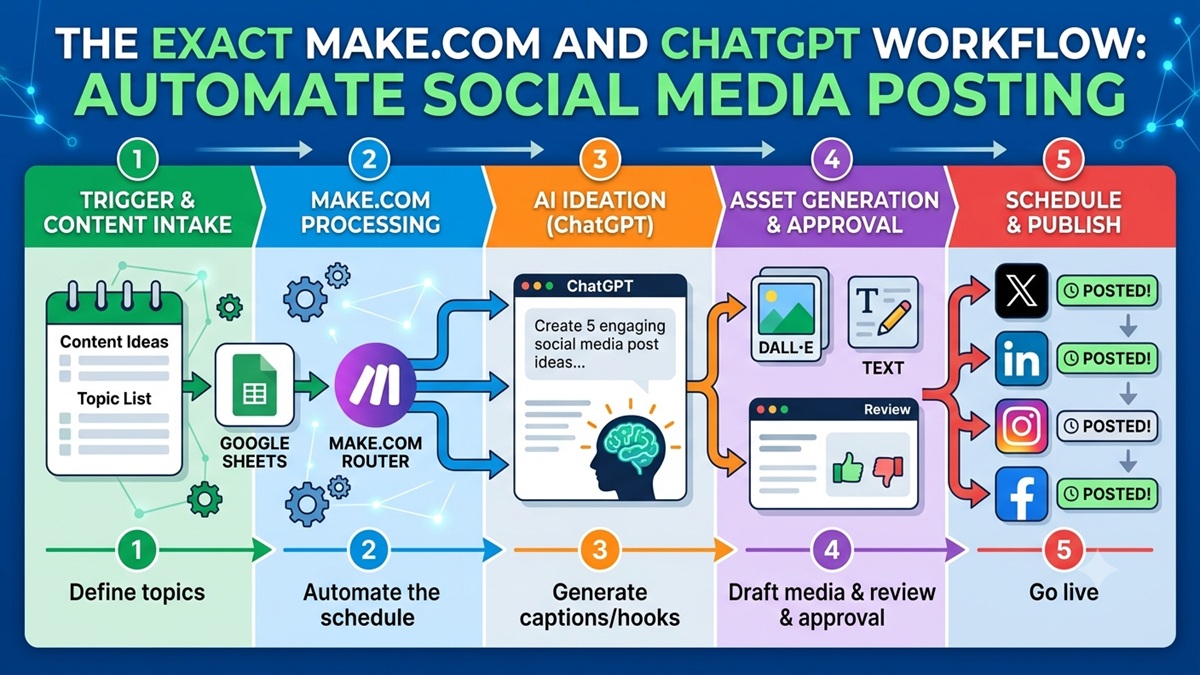
Manually writing, formatting, and scheduling social media posts is one of the biggest time-sinks for modern creators and digital marketers. In 2026, you shouldn’t be copy-pasting the same generic message across four different apps.
By building a simple, multi-channel automation machine using Make.com and the ChatGPT API, you can turn a single raw topic idea into highly customized, platform-specific content for LinkedIn, X (Twitter), Instagram, and Facebook—and publish it automatically.
Here is the exact step-by-step blueprint to build this content factory in under an hour.
The Automation Stack
To build this, you will need free or basic tier accounts on the following platforms:
- Google Sheets: Your centralized content intake dashboard.
- Make.com: The workflow builder that handles the logic and triggers.
- OpenAI API Key: To access ChatGPT’s brain directly for high-volume content rewriting.
- Your Social Accounts: Developer access/connections for LinkedIn, X, and Meta (Facebook/Instagram).
📊 The Master Workflow Blueprint
The entire automation handles the heavy lifting by processing your content ideas through five clean stages:
| Stage | Action | Platform | Data Input/Output |
| 1. Trigger | New Row Added | Google Sheets | Input: Raw topic idea or an article URL. |
| 2. Routing | Split the Workflow | Make.com Router | Duplicates the data to run 4 parallel tasks at once. |
| 3. AI Ideation | Platform-Specific Rewriting | ChatGPT (API) | Output: Unique copy optimized for 4 different audiences. |
| 4. Asset Generation | Media/Image Check | DALL-E / Canva API | (Optional) Attaches a visual graphic or review link. |
| 5. Publish | Push Live or Schedule | Social Media APIs | Posts the finalized content automatically. |
Step 1: Set Up Your Content Intake Dashboard
Open Google Sheets and create a simple sheet named Social Media Content Factory. Set up the following columns:
Topic / URL(This is where you type your raw idea)LinkedIn StatusX StatusInstagram StatusFacebook Status
Step 2: Configure the Make.com Logic
Log into Make.com, create a new scenario, and add your first module: Google Sheets -> Watch Rows. Set it to monitor your Social Media Content Factory sheet.
Next, add a Router module immediately after the Google Sheets module. Connect four separate paths to this router. Each path represents a different social media network.
Step 3: The Secret Sauce (Platform-Specific Prompting)
The biggest mistake people make with AI automation is sending the exact same text to every network. LinkedIn users want detailed case studies; X users want snappy, short hooks; Instagram users look for lifestyle summaries.
In each of the four router paths, add a OpenAI -> Create a Completion (GPT-4o or GPT-4o-mini) module. Use these exact specialized system prompts:
Path A: LinkedIn (Professional & Authority-Driven)
System Prompt: You are a B2B content marketing expert. Take the input topic and write a thought-leadership text post. Focus on business strategy, data-driven insights, and professional growth. Use short paragraphs for readability and end with a question that drives community engagement.
Path B: X / Twitter (Conversational & Punchy)
System Prompt: You are an expert ghostwriter for Tech Twitter. Take the input topic and turn it into a high-impact thread or single post. Start with a viral, attention-grabbing hook sentence. Use highly concise phrasing, zero fluff, and relevant tags.
Path C: Instagram (Visually Descriptive & Summarized)
System Prompt: You are a creative social media manager. Write an Instagram caption summarizing the input topic. Use a casual, inspiring tone, heavily incorporate emojis to break up text, and append 5 targeted, high-value hashtags at the very bottom.
Path D: Facebook (Community & Broad Appeal)
System Prompt: You are a community engagement specialist. Rephrase the input topic into an easily digestible, conversational post designed for a mainstream audience. Focus on storytelling and encouraging shares/likes.
Step 4: Map the Output and Publish
At the end of each AI module path, add the corresponding native publishing module in Make:
- LinkedIn -> Create a Share
- Twitter/X -> Create a Tweet
- Instagram for Business -> Publish a Photo/Video
- Facebook Pages -> Create a Post
Map the text output from each respective ChatGPT module directly into the “Content” or “Text” fields of these publishing modules.